
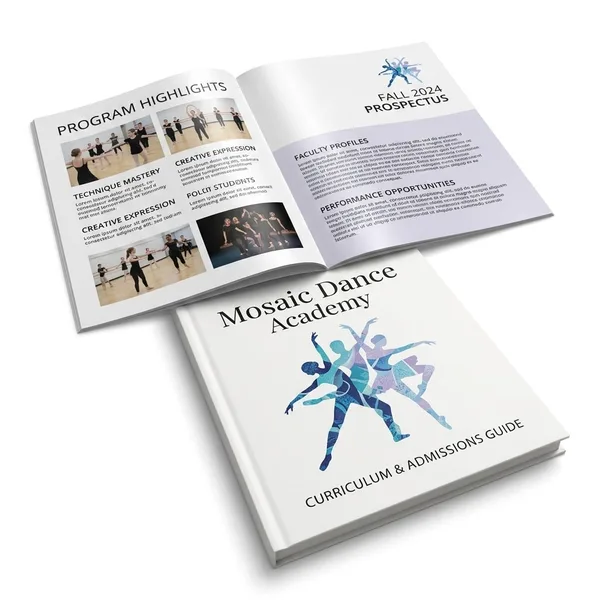
Dull Book with Satin AQ Booklets
Best Quality Printing is your trusted provider of high-quality Dull Book With Satin AQ Booklets. Visit our site and view our products!
Have a question about this product?- 8.5" x 11"- 12 page
- 8.5" x 11"- 16 page
- 8.5" x 11"- 4 page
- 8.5" x 11"- 6 page
- 8.5" x 11"- 8 page
- 100LB Dull Book
- 4/4 (4 color both sides)
- Satin Aqueous
- Short Edge
- Long Edge
- Saddle Stitch
- Satin Aqueous
- 100LB Dull Book
- 12 pages (4 cover 8 inside)
- 8 pages (4 cover 4 inside)
- 16 pages (4 cover 12 inside)
- 4 Business Days
- 7 Business Days
Frequently asked questions about Dull Book with Satin AQ Booklets
How do I set up a booklet?
First, download one of our [certified templates](https://bestqualityprinting.com/templates/files/list/category/booklets/). Please adhere to the following guidelines when creating a booklet:
i. The page count begins on the cover as “page 1”. The inside cover will be “page 2”, and so on.
ii. Please note: if you have artwork created by another company, it may not necessarily meet Best Quality Printing guidelines.
iii. Total bleed is.25” and total safety is.5”. This allows us to set up your crossovers properly. Crossovers are common in booklets and require extra attention. A crossover is an image, text, or other graphic element that transitions from one page to another.
1\. For example, an 8.5” x 11” booklet with bleed should be 8.75” x 11.25” total.
iv. Only single pages will be accepted. No readers or printer spreads will be accepted.
v. We prefer a multipage PDF, but single-page files are accepted.
vi. Designers must pay close attention to the crossover design and make sure it is as seamless as possible on the finished piece. Please do not use text or thin lines as crossovers. Larger pictures create the best result.
vii. Due to the nature of saddle-stitch binding, crossovers may not line up 100% on the final booklet.
viii. Artwork created in InDesign or other layout software, as spreads or facing pages, must be saved as single-page PDFs. Please keep this in
mind, especially when creating crossovers. When you're ready to export your booklet as a PDF, please use Document Bleed Settings in the Marks and Bleeds menu.
ix. You can find instructions on how to create your document in InDesign here.
x. After submitting your booklet, you will receive an email from our online booklet proofing system, Fourte. The system will allow you to double-check all the pages and ensure they are in the correct order. Next, you can approve, decline, or re-upload pages if needed. You will also be able to preview your booklet as if it was printed and bound.
You may also be interested in
- [](https://bestqualityprinting.com/11x8-5-calendars)
[11x8.5 Calendars](https://bestqualityprinting.com/11x8-5-calendars "11x8.5 Calendars")
- [](https://bestqualityprinting.com/direct-mail-booklets)
[Direct Mail Booklets](https://bestqualityprinting.com/direct-mail-booklets "Direct Mail Booklets")
- [](https://bestqualityprinting.com/gloss-cover-with-aq-booklets)
[Gloss Cover with AQ Booklets](https://bestqualityprinting.com/gloss-cover-with-aq-booklets "Gloss Cover with AQ Booklets")
- [](https://bestqualityprinting.com/perfect-bound-catalogs)
[Perfect Bound Catalogs](https://bestqualityprinting.com/perfect-bound-catalogs "Perfect Bound Catalogs")
Glued spine—a more finished look
- [](https://bestqualityprinting.com/saddle-stitch-catalogs)
[Saddle Stitch Catalogs](https://bestqualityprinting.com/saddle-stitch-catalogs "Saddle Stitch Catalogs")
Stapled spine - simple & affordable
What sizes are available for dull book with satin aq booklets?
We currently offer 5 size options: 8.5" x 11"- 12 page, 8.5" x 11"- 16 page, 8.5" x 11"- 4 page, 8.5" x 11"- 6 page, 8.5" x 11"- 8 page. Pick your size on this page and the price updates instantly.
What stock are dull book with satin aq booklets printed on?
Dull Book with Satin AQ Booklets are printed on 100LB Dull Book.
How long do dull book with satin aq booklets take to print?
Production options for this product: 4 Business Days, 7 Business Days. Turnaround starts once your print-ready files are approved (files in before 10 a.m. Pacific count toward the same business day). UPS shipping transit is shown separately at checkout.
Will my printed colors match my screen?
Screens show RGB; presses print CMYK, so vivid screen colors can shift. Design in CMYK at 300 dpi for the closest match. We review every file before printing and contact you if a conversion will visibly change your colors.
Do you check my file before printing?
Yes — every order gets a file review before it goes to press. If we spot low resolution, missing bleed, or text too close to the trim line, we contact you with options before printing anything.