
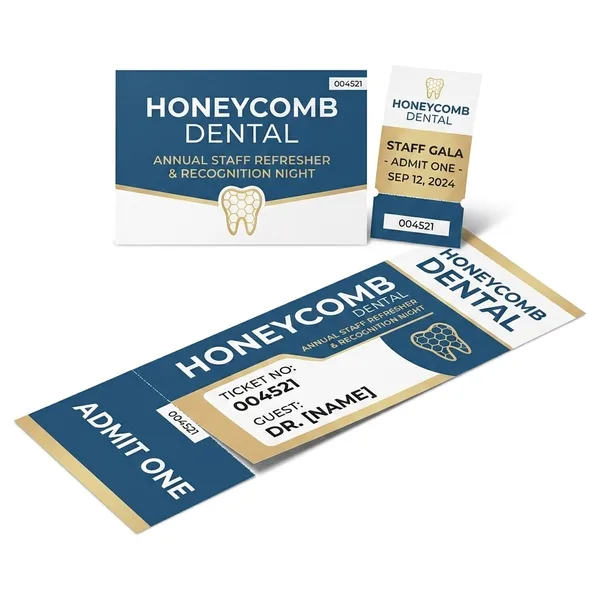
Variable Numbering Event Tickets
Best Quality Printing is your trusted provider of high-quality Custom Event Tickets With Variable Numbering. Visit our site and view our products!
Have a question about this product?- 2" x 5.5"
- 2" x 7"
- 2.75" x 5.5"
- 2.75" x 8.5"
- 3.5" x 8.5"
- 3.5" x 11"
- 4.25" x 11"
- 16PT C2S
- 18PT C1S
- 100LB Gloss Cover
- 4/4 (4 color both sides)
- 4/0 (4 color front)
- 4/1
- UV on 4-color side
- UV Coating Front Only
- No Coating
- No Perforation
- Perforation 1.5" from Bottom
- Perforation 2" from Bottom
- Perforation 2" from Right
- Perforation 1.5" from Right
- Numbering on the Front only
- Variable Numbering
- 4 Business Days
- 7 Business Days
Frequently asked questions about Variable Numbering Event Tickets
What font, size, and colors will be used for the variable numbering portion?
a. The default font for the variable numbering portion is 14pt Calibri, black ink only. Black ink for the numbering should be taken into consideration when designing your artwork file. If your background images are dark, you may need to KO (knock out) the background image in the numbering areas, so that the numbers are visible.
b. Note: The CSV data file may contain up to 5 digits or characters for each record.
Will I be able to see a sample or a proof of the numbering on my artwork before my order is printed?
Yes. We will send a PDF proof to the email address on your trade account. The PDF proof will show an example of one address on your artwork. Reply to the email with your approval by mentioning “okay to print as is” or request an FTP code to upload revised files. Revised files will be processed and a new proof will be sent for your approval.
What types of files can I upload for event tickets with variable numbering?
a. Artwork file formats: We recommend pdf. You may also send the following types: jpg, jpeg, tif, tiff, eps, and png.
b. Data file format: We accept CSV (comma delimited) format only. To download a CSV data file sample, click here.
c. Note: The CSV data file may contain up to 5 digits or characters for each record.
How do I indicate what areas of the ticket I want to be numbered, how do I set up my CSV data file?
Choose from the 9 numbered areas shown in the example to the right. You may choose as few or as many areas as you like. Indicate which areas you would like to utilize by naming the column headers on your CSV data file with the corresponding area name.
Will Best Quality Printing modify my CSV data file to correct any errors or typos?
No, Best Quality Printing does not proofread, flag, or correct errors. It is your responsibility to double-check and ensure the accuracy of your data.
What if my CSV data file has more addresses than the run size that I ordered?
Best Quality Printing will print the full run size ordered. If your CSV data file contains more records than the run size ordered, Best Quality Printing will not print those additional records.
How do I prepare my CSV data file with leading zeros, for example, I want my starting number to be 00001?
a. In order to preserve leading zeroes on your variable number CSV file (e.g. 001, 0001) please format the cells as text before creating your numbered list.
b. To include leading zeros: Right-click (or control click) on the first few cells, then choose Format Cells > Text or Plain Text. Once your cells are formatted, proceed with creating your numbered list. You should be able to see your numbering correctly before saving your document.
c. Note: If you close and reopen your document or look at a preview of the document, it will appear that the CSV has reverted and your leading zeroes were deleted; however, be assured that is not the case. As long as you were able to see the leading zeros at the time you saved the document, your CSV has the leading zeros. It is safe to upload your CSV and your leading zeroes will be preserved.
How far in advance should I order for an event?
Work backwards from the date you need it in hand, not the event date. Subtract ground transit, then the production turnaround (which starts once your files are approved), then three to five business days of buffer. That buffer is the reprint window — it’s what keeps a problem from becoming a missed date. For weddings, trade shows and grand openings we’d order two to three weeks out. Tell us your date when you order and we’ll tell you honestly whether it’s realistic.
Is the delivery date I see at checkout guaranteed?
We show you two separate numbers rather than one blended arrival date: the production turnaround you selected, and the live UPS service and transit time for your address. Production starts when your print-ready files are approved. Neither number includes a safety margin, so for a fixed date you should add your own buffer on top rather than treating the estimate as the expected case.
What happens if my order is going to be late?
You hear it from us, not from a tracking page that never updates. If your job isn’t going to make the date we gave you, we contact you while you still have options — a faster shipping service, a substitute stock, or a partial shipment of whatever is needed first. We’re a small family-run shop, so you’re talking to the person who actually knows where your job is.
If something is wrong and needs a reprint, will it still make my event?
A reprint runs a full production cycle again, so it only makes your date if you left room for one. That’s why we suggest a buffer of at least three to five business days on dated work. We also try to prevent the reprint in the first place: a real person checks your file for resolution, bleed, margins and color space before it goes to press, and contacts you if something looks off.